Open Live Cloud-Native Live Broadcast Production
Deploy a complete live broadcast production suite on Open Source Cloud in minutes. No infrastructure to manage. Predictable monthly plan with production hours included.
Vision mixing, audio mixing, multiviewer, and intercom: all in your browser, fully managed on OSC. Sign in, create an environment, and start producing.
Managed on Open Source Cloud · Free & open source · Zero lock-in
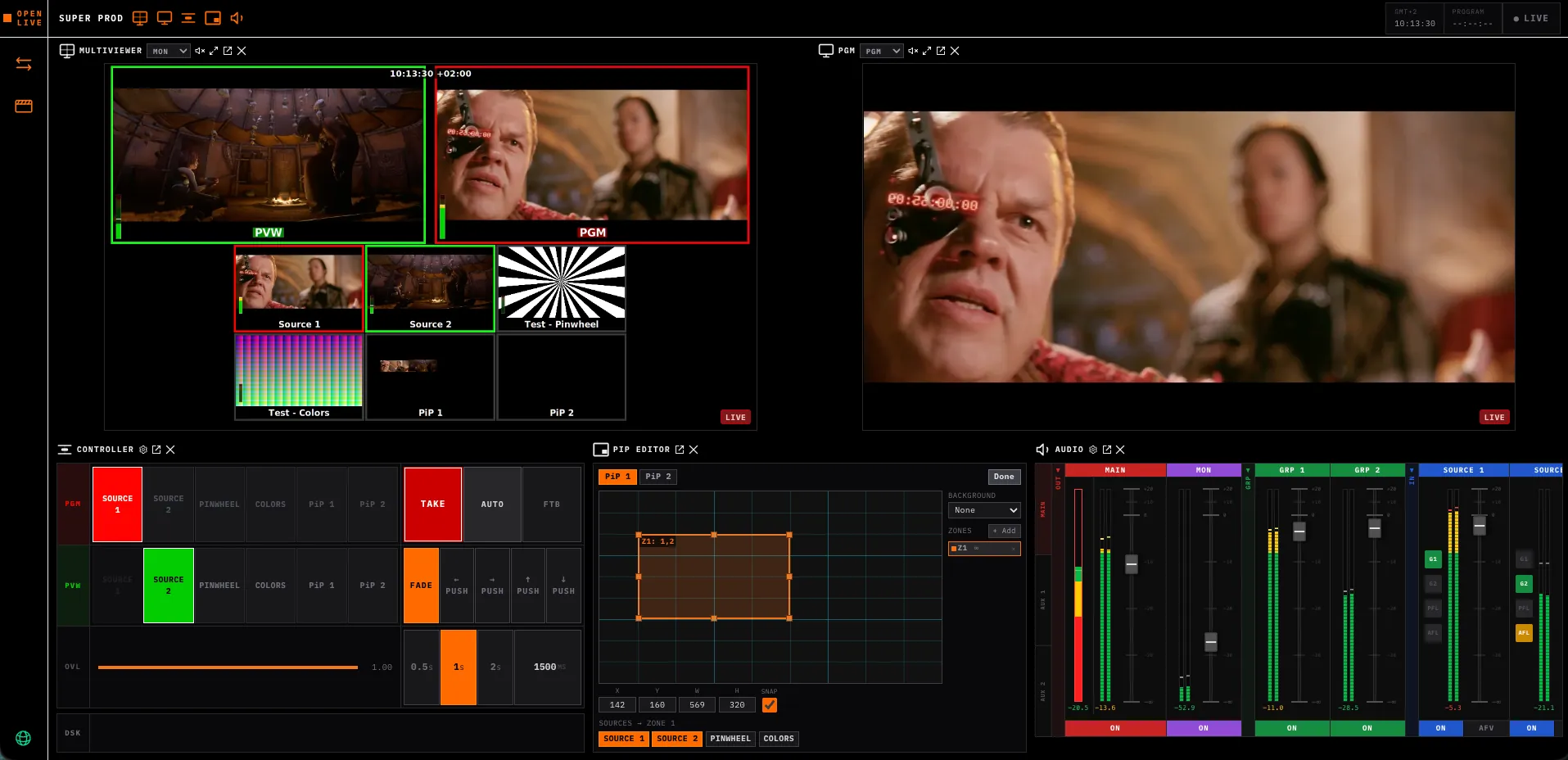
Up and running in minutes
No Kubernetes. No infrastructure setup. Just an OSC account and a name for your environment.
Sign in with OSC
Connect your Open Source Cloud account. Free to try. No credit card required to get started.
Create your environment
Name your production environment and click Create. Open Live, the studio, and the database spin up in parallel, ready in under two minutes.
Start producing
Open the studio URL, add your sources, mix audio, and go live. The full production suite is waiting in your browser.
What is Open Live?
Open Live is a free and open-source live broadcast production platform that runs entirely in the browser. It replaces traditional broadcast hardware (vision mixers, audio consoles, multiviewers) with a cloud-native production suite anyone can access from any device. Sources come in over SRT or WebRTC, and the programme output goes out the same way, all with low latency. Use it fully managed on Open Source Cloud, or deploy it on any cloud or on-premise Kubernetes infrastructure.
The interface is fully configurable: every panel can be toggled on or off to keep your workspace focused, and popped out into its own browser window so you can spread your production across multiple screens exactly the way you want. Put the multiviewer on a confidence monitor, keep audio on a second display, and run the vision mixer on your main screen. On Open Source Cloud, a fully managed environment is ready in minutes, no Kubernetes expertise required.
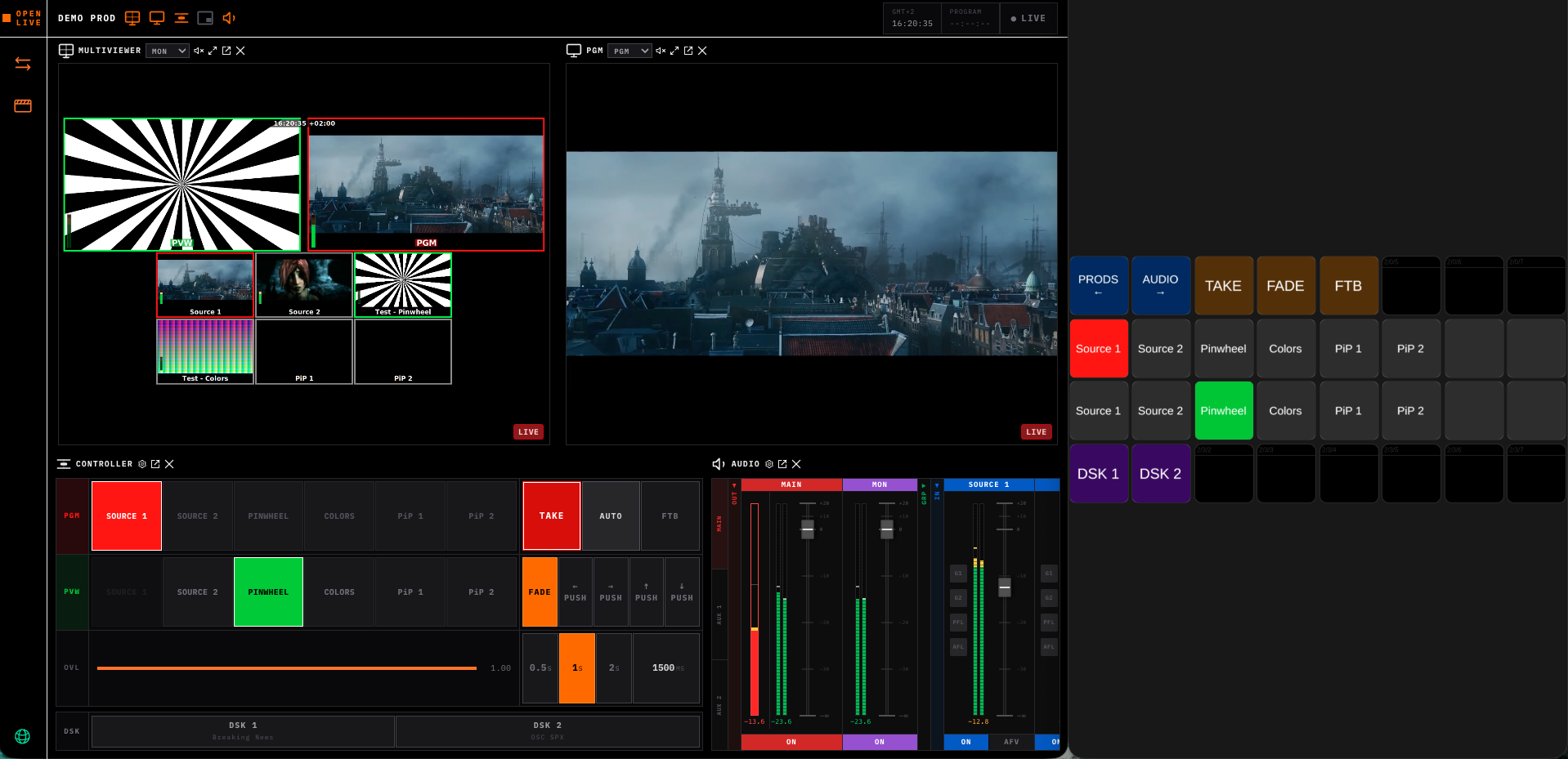
Built for REMI & Remote Production
Connect distributed production crews with a complete cloud-native broadcast stack. No trucks, no hardware shipments, no site visits.
Deploy in Minutes
Spin up a complete Open Live environment in minutes, on Open Source Cloud or your own Kubernetes cluster. No hardware procurement, no shipping delays.
Crew Works from Anywhere
Directors, producers, and engineers connect from home, HQ, or venue from any modern browser. EFP cameras stay at the venue, no travel required for the production team.
Reduce Production Costs
Eliminate travel, equipment shipping, and on-site crew costs. Scale resources up for big productions and back down when idle, so you are not paying for capacity you are not using.
Low-Latency Everywhere
SRT keeps camera feeds rock-solid over the public internet. The multiviewer gives you sub-500ms WebRTC glass-to-glass monitoring of your feeds, fast enough for real production confidence viewing.
Complete Production Suite
Browser-Based Vision Mixer
Full production controller in your browser. Cuts, auto transitions, DSK layers, picture-in-picture, graphics overlays, fade-to-black. Stream Deck support via WebHID.
Hardware-Quality Audio Mixer
Per-channel faders, mute, AFL/PFL monitoring, aux sends, group buses, EBU R128 loudness metering. AFV (audio-follows-video) with configurable ramp times.
Multi-Source Multiviewer
Monitor all sources, programme, and preview simultaneously. Sub-500ms WebRTC glass-to-glass latency. No dedicated hardware monitor required. Runs in any browser.
Stream Deck Control Surface
Physical production control via Elgato Stream Deck and Bitfocus Companion. Cut, transition, mute audio, trigger graphics, all from a tactile control surface.
EFP Camera Ingest
Multi-camera ingest over EFP and SRT. Sequence number validation prevents A/V sync drift across camera feeds.
GPU Rendering Pipeline
High-quality graphics compositing, transitions, and multiview generation, GPU-accelerated so it stays smooth even at scale.
Production-Ready Infrastructure
Open source does not mean experimental. Open Live is built on the same infrastructure standards used by professional broadcasters.
Cloud Native
Every component is a Kubernetes workload. GPU nodes for rendering, CPU nodes for orchestration. Deploy to AWS, GCP, Azure, or your own data centre.
GStreamer Pipeline
Proven GStreamer media pipeline. Watchdog-guarded to prevent silent hangs, with structured JSON logging and health and readiness endpoints on every service.
Security by Default
SRT with passphrase and key length enforced. WebRTC TURN server required for all connections. Secrets via environment variables only, never in config files.
Elastic Scaling
Scale resources to match production size. Run a minimal footprint for small productions, scale up for large events, on your own infrastructure or fully managed on Open Source Cloud.
Technical Specifications
A quick reference for the numbers behind Open Live's production pipeline:
- Real-time 4K mixing via NVENC hardware encoding. Video mixing runs in real time at 4K (3840x2160) using NVENC hardware encoding on a commodity GPU.
- Zero-copy GPU pipeline. Decode, composite and encode run in one pass on the GPU when CUDA-GL interop is available on the host; if interop fails, only the color-conversion step falls back to CPU.
- EBU R128 loudness metering. The audio mixer measures momentary and integrated loudness plus true peak against the EBU R128 standard.
- Sub-500ms WebRTC monitoring. The multiviewer targets sub-500ms glass-to-glass latency for monitoring feeds.
- SRT and EFP contribution ingest. Cameras and remote sources feed in over SRT or traditional EFP contribution links; EFP ingest includes sequence-number validation to prevent A/V sync drift.
Open Live vs the Alternatives
See how Open Live compares to traditional production tools for live broadcast.
| Feature | Open Live | OBS Studio | vMix | Traditional Hardware |
|---|---|---|---|---|
| Deployment | Open Source Cloud (managed) or self-hosted Kubernetes | Single Windows/Mac machine | Windows PC only | Dedicated OB van or studio |
| Multi-camera switching | Full vision mixer: up to 16 sources | Basic scene switching only | Full vision mixer | Full vision mixer |
| Audio console | Full mixer: aux, groups, EBU R128 | Basic audio mixing | Full audio mixer | Dedicated hardware console |
| Multiviewer | Browser-based: low latency WebRTC | None | Requires additional output | Dedicated hardware multiviewer |
| Remote production (REMI) | Built for REMI: fully cloud-native | Not designed for REMI | Limited remote capability | Expensive IP extensions needed |
| Stream Deck control | Native browser support via Companion | Via third-party plugins | Native support | Proprietary hardware only |
| Cost | Free & open source: self-hosted; monthly plan if managed | Free | $60–1200 USD one-time license | $50,000–500,000+ USD |
| Vendor lock-in | Open source: zero lock-in | Open source | Proprietary | Proprietary |
Open Live is not another proprietary cloud production SaaS. The vision mixer, audio mixer and GPU rendering pipeline are open source under MIT (open-live, open-live-studio) and Apache-2.0 (strom) licenses. The same codebase the managed tier runs can be self-hosted on your own Kubernetes cluster, on any cloud, or on-premises - see our verified exit test for what that switch actually looks like.
Why Open Source Cloud?
Everything you need to run a professional broadcast: managed, scalable, and metered by the minute within your plan.
Managed infrastructure
No Kubernetes expertise needed. OSC runs the full stack (GPU rendering, media pipelines, database) so your team focuses on the production, not the platform.
Predictable plan pricing
Production hours count only while a production is running, inside the hours your plan includes. Spin up for an event, stop it after the show.
Zero lock-in
Open Live is fully open source. Every component can be self-hosted on any Kubernetes cluster. OSC is a convenience, not a dependency.
Always up to date
OSC deploys the latest Open Live release automatically. No manual upgrades, no downtime windows to plan around.
Simple, Transparent Pricing
Open Live Personal
Included with the OSC plan Personal
7 production hours per month on shared Strom
- Open Live
- Open Live Studio
- CouchDB
- Full broadcast production suite
- Unused hours carry over
- Or bring your own Strom: no hour limit from us, run as long as your own Strom allows
- Need more? Extra hours from 9.90 EUR
- Cancel anytime
7.5 extra production hours on upgrade (one-time) · Database backups · My Agent Tasks
Open Live Professional
Included with the OSC plan Professional
200 production hours per month on shared Strom
- Open Live
- Open Live Studio
- CouchDB
- Full broadcast production suite
- Unused hours carry over
- Or bring your own Strom: no hour limit from us, run as long as your own Strom allows
- Need more? Extra hours from 9.90 EUR
- Cancel anytime
7.5 extra production hours on upgrade (one-time) · Custom domains · IMAP/SMTP mail · Database backups · My Agent Tasks
Open Live Business
Included with the OSC plan Business
720 production hours per month on shared Strom
- Open Live
- Open Live Studio
- CouchDB
- Full broadcast production suite
- Unused hours carry over
- Or bring your own Strom: no hour limit from us, run as long as your own Strom allows
- Need more? Extra hours from 9.90 EUR
- Cancel anytime
7.5 extra production hours on upgrade (one-time) · Custom domains · IMAP/SMTP mail · Database backups · My Agent Tasks
For dedicated capacity, add a Hosted GPU.
How production hours work
- Hours are counted by the minute, only while a production is running.
- Unused hours carry over to the next month.
- A production left running counts hours even when nothing is happening. Stop it after the show.
- The balance is shared with everything else in your workspace, so you have fewer hours if the workspace runs other services.
- Need more? Buy extra hours any time: 2.5 hours for 9.90 EUR or 7.5 hours for 25 EUR. Buy extra hours
Optional Add-ons
Hosted GPU
Add-onDedicated GPU, guaranteed capacity, no shared load, fully managed. This is what you want for live production.
From 750 EUR/month
From 5 EUR/hour
Contact sales@eyevinn.seFrequently Asked Questions
What is Open Live?
Open Live is a free and open-source cloud-native live broadcast production platform. It provides a complete production suite including a browser-based vision mixer, hardware-quality audio mixing, multiviewer, and low-latency WebRTC viewing. It runs on Kubernetes: cloud or on-premise.
How does Open Live compare to OBS or vMix?
Unlike OBS (single-machine, basic scene switching only) or vMix (Windows-only, licensed software), Open Live is fully browser-based, cloud-native, and free to self-host. It runs on Kubernetes with no installed software and supports professional broadcast protocols like EFP, SRT, and WebRTC. It's designed for multi-camera live production, not single-stream recording.
What cameras are supported?
Open Live supports EFP cameras, SRT sources, and any WebRTC-capable source. The ingest layer handles camera synchronisation and multi-feed ingestion, validating EFP sequence numbers to prevent A/V sync drift. Up to 16 sources can be connected to a single production.
What is the viewing latency?
Open Live targets sub-500ms glass-to-glass latency for the multiviewer over WebRTC. The viewer runs in any browser without plugins.
Can I self-host Open Live?
Yes. Open Live is fully open source. The easiest path is Open Source Cloud: sign in, spin up an environment, no infrastructure to manage. You can also deploy on any Kubernetes cluster (AWS, GCP, Azure, or on-premise). The full source code is available on GitHub.
What happens to my production stack if the vendor disappears?
Nothing breaks. Open Live is fully open source under the MIT licence. The code lives on GitHub and continues working regardless of what happens to Eyevinn or Open Source Cloud. You can self-host the entire stack on your own Kubernetes cluster today, and your live production workflows keep running on open standards (WebRTC, SRT, EFP, WHEP) without any proprietary dependencies.
Is Stream Deck support included?
Yes. Open Live includes a Bitfocus Companion module for Elgato Stream Deck integration. You can cut cameras, trigger transitions, mute audio channels, and control graphics overlays from a physical control surface.
Can I use intercom with Open Live?
Open Intercom is a free and open-source intercom system that runs alongside Open Live, deployed on Open Source Cloud or self-hosted locally. It provides browser-based intercom for remote commentators and production crew at sub-200ms latency, with no hardware required. Open Intercom has its own Bitfocus Companion module, so you can control both Open Live and Open Intercom from the same Stream Deck.
Is there an open-source alternative to a cloud broadcast studio?
Open Live runs fully managed on Open Source Cloud, a convenience layer on top of the same open source stack, with no vendor lock-in. You can also self-host on standard infrastructure (Kubernetes on AWS, GCP, Azure, or on-premises) at any time. The production engine, multiviewer, contribution layer, and playout are all MIT-licensed code you can inspect on GitHub.
What is the latency of a browser-based multiviewer?
Open Live delivers sub-500ms glass-to-glass latency over WebRTC for the browser-based multiviewer. This matches the real-time requirement for live production monitoring and talent confidence feeds without dedicated hardware.
Can I run live production on my own Kubernetes cluster?
Yes. Open Live is distributed as container images. The Open Source Cloud managed tier handles all infrastructure automatically. It is the fastest way to get started. For full ownership of the stack, you can also deploy on any CNCF-conformant Kubernetes cluster: AWS EKS, Google GKE, Azure AKS, or on-premises bare-metal.
What protocols does cloud live production support?
Open Live supports WebRTC for browser-based contribution and monitoring, SRT for resilient file-based and contribution transport, EFP for traditional broadcast camera contribution, and WHEP for standardised WebRTC egress. This covers the full range from browser tab to hardware encoder.
How many camera sources can I run?
Open Live handles up to 16 simultaneous camera sources in a single production. Each source can be a browser-based WebRTC contributor, an SRT encoder, or an EFP hardware camera, mixed freely within the same production.
How does Open Live compare to cloud production platforms?
Open Live is fully open source under MIT and Apache-2.0, so the exact codebase running on the managed tier can also be self-hosted on your own Kubernetes cluster, on any cloud, or on-premises. Proprietary cloud production SaaS keeps that choice with the vendor. Open Live keeps it with you - see our exit test verification.
More from Open Source Cloud
Open Live is part of the OSC broadcast cluster: tools that work together for live production.
- Open Intercom: browser-based intercom for remote production crews
- Open Media Convert: cloud-native media transcoding and packaging
- Auto Subtitles: automatic subtitle generation for video content
Delete instance?
This will permanently delete and all its data. This cannot be undone.
Upgrade to
You picked the plan. Continue to checkout on OSC to finish your upgrade. Checkout opens in a new window.
Your browser blocked the checkout window. Open checkout in a new tab instead.
Your Open Live
Production hours used this month
Create New Open Live
Use your own Strom instance (optional)
Leave blank to use the shared GPU capacity. Fill in a Strom server URL to point this environment at your own instance instead.